Showing posts with label batch. Show all posts
Showing posts with label batch. Show all posts
Friday, 20 September 2013

Ax 2012: Debugging of server/batch jobs
All batch jobs and service operations now run in managed code (IL) and require different debugging steps. Rather than setting breakpoints within X++, you need to set them within the IL code that corresponds to the X++ code and debug in Visual Studio.
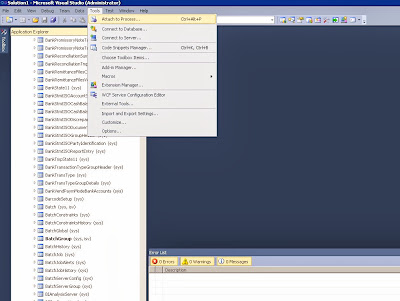
Source: https://community.dynamics.com/ax/b/mafsarkhan/archive/2011/05/30/how-to-debug-batch-jobs-and-service-operations-in-dynamics-ax-2012.aspx#.UjwULcZT6k8
- Open Visual Studio as 'administrator' and attach the debugger to the Ax32Serv.exe process.
- Once done, open up the file you want to debug in Visual Studio. All of the X++ code is compiled into IL and can be found in the following directory after deployment:..\Program Files\Microsoft Dynamics Ax\6.0\Server\AxaptaDev\Bin\XppIL\source\
- Set a breakpoint in the file you opened.
- Go to Ax and run the process in batch mode, or execute the service operation. This will end up hitting your breakpoint, provided you set it in the right place.
Source: https://community.dynamics.com/ax/b/mafsarkhan/archive/2011/05/30/how-to-debug-batch-jobs-and-service-operations-in-dynamics-ax-2012.aspx#.UjwULcZT6k8
Subscribe to:
Posts (Atom)