We had interesting problem with updating of some data entities' DefaultDimension. Normally for update Connector asks for original data (performs find operation), uses those data as default data and overwrite only those data where values are provided from 3rd party system. It means that any of data defaulted in AX, when create operation was performed, is not overwritten by empty values.
Showing posts with label Ax2012. Show all posts
Showing posts with label Ax2012. Show all posts
Tuesday, 12 May 2015

Wednesday, 11 February 2015
Default Dimensions seem to be just single field of type long instead of dictionary entity in Connector and in VS
There is probably
incorrect Extended Data Type on DefaultDimension field in table. There should
be DimensionDefault. If there is another one (e.g. RefRecId) then correct code
is not generated by AIF wizard to Ax<Table> class and to Data object class.
Ax<Table>
class:
change EDT in parmDefaultDimension method to
"DimensionDefault"
<Service>_<Table>
class:
add method
createDefaultDimension
public AifDimensionAttributeValueSet createDefaultDimension()
{
return this.get_NewContainer(#DefaultDimension);
}
change method
parmDefaultDimension
public
AifDimensionAttributeValueSet
parmDefaultDimension(AifDimensionAttributeValueSet _value = null)
{
if (!prmisDefault(_value))
{
this.set_Container(#DefaultDimension,
_value);
}
return
this.get_Container(#DefaultDimension);
}
Friday, 31 October 2014
AX 2012 Integrations - using Microsoft Connector for Dynamics
Although MS Connector for Dynamics' purpose is to connect and integrate products from MS Dynamics family it is possible to use it to integrate AX and 3rd party's systems.
We are currently using Connector this way. I faced several problems through AIF services development to be able to use them with Connector. Here are some points.
We are currently using Connector this way. I faced several problems through AIF services development to be able to use them with Connector. Here are some points.
Thursday, 22 May 2014
AX 2012 R3 Demo running on Azure
I was thinking how to try new release of AX 2012 when the test environment (virtual machine) provided by Microsoft is quite demanding and I have no server with required configuration.
I found this article about how to set up AX 2012 R3 demo on Azure. Hope it will help.
http://blogs.msdn.com/b/axinthefield/archive/2014/05/01/setting-dynamics-ax-2012-r3-demo-with-lcs-and-azure.aspx
Note: You will need acces to Dynamics Lifecycle Services (https://lcs.dynamics.com/) and some Azure subscription.
I found this article about how to set up AX 2012 R3 demo on Azure. Hope it will help.
http://blogs.msdn.com/b/axinthefield/archive/2014/05/01/setting-dynamics-ax-2012-r3-demo-with-lcs-and-azure.aspx
Note: You will need acces to Dynamics Lifecycle Services (https://lcs.dynamics.com/) and some Azure subscription.
Friday, 28 March 2014
Ax 2012: Pass printer settings from class dialog to SSRS report
For one project I needed to create standard runnable class which calls SSRS report in a while loop. The question was how to work with the printer/destination settings.
Solution:
1. Create your runnable class "YourController" from which you will control calls of your report "YourReport".
2. Create your printer setup class "YourPrinterSetup".
class YourPrinterSetup extends RunBase
{
Map mapPrinterSettings;
YourController baseClass;
Args args;
#define.CurrentVersion(1)
#localmacro.CurrentList
mapPrinterSettings
#endmacro
}
void new(Args _args)
{
;
mapPrinterSettings = new Map(Types::Enum, Types::Container);
Args = _args;
}
public container pack()
{
return [#CurrentVersion, [#CurrentList, mapPrinterSettings.pack()]];
}
public boolean unpack(container _packedClass)
{
Version version;
container packedPrinterSettings, packedOutPaymRecordList, packedValues;
version = RunBase::getVersion(_packedClass);
switch (version)
{
case(#CurrentVersion) :
[version, packedValues] = _packedClass;
[#currentList, packedPrinterSettings] = packedValues;
break;
default :
return false;
}
if (packedPrinterSettings)
{
// Recreate the object from the packed values.
mapPrinterSettings = Map::create(packedPrinterSettings);
}
else
{
mapPrinterSettings = new Map(Types::Enum, Types::Container);
}
return true;
}
static void main(Args _args)
{
YourPrinterSetup printSetup = new YourPrinterSetup(_args);
printSetup.run();
}
updatePrinterSettings is used to store chosen settings.
public void updatePrinterSettings(container _printerSettings)
{
mapPrinterSettings.insert("1", _printerSettings);
baseClass.setPrinterSettings(_printerSettings);
}
In run method the standard SRSPrintDestinationSettings class is called.
void run()
{
SrsPrintDestinationSettings printSettings;
FormRun printSettingForm;
boolean ok = true;
Object caller = args.caller();
baseClass = caller.runbase();
printSettings = new SrsPrintDestinationSettings();
printSettings.unpack(this.getPrinterSettings());
printSettings.fromPage(1);
printSettings.toPage(99999999);
args.caller(printSettings);
args.name(formstr(SRSPrintDestinationSettingsForm));
printSettingForm = classfactory.formRunClass(args);
printSettingForm.init();
printSettingForm.run();
printSettingForm.wait(true);
ok = printSettingForm.closedOk();
if (ok)
{
this.updatePrinterSettings(printSettings.pack());
}
}
3. Create Menu item "YourPrinterSetupMenuItem" of type Action. Object type Class, Object "YourPrinterSetup" class.
4. Add "YourPrinterSetupMenuItem" to the dialog of your "YourController" class. Something like this:
dialog.addMenuItemButton(MenuItemType::Action, "YourPrinterSetup", DialogMenuItemGroup::CurrentGrp);
5. Don't forget to implement setPrinterSettings method to your "YourController" class. It is used to pass chosen printer settings to "YourController".
public void setPrinterSettings(container _settings)
{
printerSettings = _settings;
printDestinationSettings = new SRSPrintDestinationSettings();
if (conlen(printerSettings) > 0)
{
printDestinationSettings.unpack(printerSettings);
dialogReportDestination.value(strFmt("%1", printDestinationSettings.printMediumType()));
}
}
6. Pass printer settings to your "YourReport". Use it in that place where you call the report. See example below.
public class YourController extends RunBaseBatch
{
container printerSettings;
}
public void run()
{
SrsReportRunController srsReportRunCont;
SRSPrintDestinationSettings printDestinationSettings;
printDestinationSettings = new SRSPrintDestinationSettings();
if (conlen(printerSettings) > 0)
{
printDestinationSettings.unpack(printerSettings);
}
srsReportRunCont = new SrsReportRunController();
srsReportRunCont.parmReportName('YourReport.Report');
srsReportRunCont.parmReportContract().parmPrintSettings(printDestinationSettings);
}
Hope it will help someone.
Mind that you can modify SrsPrintDestinationSettingsForm to enable/disable possibilities.
Solution:
1. Create your runnable class "YourController" from which you will control calls of your report "YourReport".
2. Create your printer setup class "YourPrinterSetup".
class YourPrinterSetup extends RunBase
{
Map mapPrinterSettings;
YourController baseClass;
Args args;
#define.CurrentVersion(1)
#localmacro.CurrentList
mapPrinterSettings
#endmacro
}
void new(Args _args)
{
;
mapPrinterSettings = new Map(Types::Enum, Types::Container);
Args = _args;
}
public container pack()
{
return [#CurrentVersion, [#CurrentList, mapPrinterSettings.pack()]];
}
public boolean unpack(container _packedClass)
{
Version version;
container packedPrinterSettings, packedOutPaymRecordList, packedValues;
version = RunBase::getVersion(_packedClass);
switch (version)
{
case(#CurrentVersion) :
[version, packedValues] = _packedClass;
[#currentList, packedPrinterSettings] = packedValues;
break;
default :
return false;
}
if (packedPrinterSettings)
{
// Recreate the object from the packed values.
mapPrinterSettings = Map::create(packedPrinterSettings);
}
else
{
mapPrinterSettings = new Map(Types::Enum, Types::Container);
}
return true;
}
static void main(Args _args)
{
YourPrinterSetup printSetup = new YourPrinterSetup(_args);
printSetup.run();
}
updatePrinterSettings is used to store chosen settings.
public void updatePrinterSettings(container _printerSettings)
{
mapPrinterSettings.insert("1", _printerSettings);
baseClass.setPrinterSettings(_printerSettings);
}
In run method the standard SRSPrintDestinationSettings class is called.
void run()
{
SrsPrintDestinationSettings printSettings;
FormRun printSettingForm;
boolean ok = true;
Object caller = args.caller();
baseClass = caller.runbase();
printSettings = new SrsPrintDestinationSettings();
printSettings.unpack(this.getPrinterSettings());
printSettings.fromPage(1);
printSettings.toPage(99999999);
args.caller(printSettings);
args.name(formstr(SRSPrintDestinationSettingsForm));
printSettingForm = classfactory.formRunClass(args);
printSettingForm.init();
printSettingForm.run();
printSettingForm.wait(true);
ok = printSettingForm.closedOk();
if (ok)
{
this.updatePrinterSettings(printSettings.pack());
}
}
3. Create Menu item "YourPrinterSetupMenuItem" of type Action. Object type Class, Object "YourPrinterSetup" class.
4. Add "YourPrinterSetupMenuItem" to the dialog of your "YourController" class. Something like this:
dialog.addMenuItemButton(MenuItemType::Action, "YourPrinterSetup", DialogMenuItemGroup::CurrentGrp);
5. Don't forget to implement setPrinterSettings method to your "YourController" class. It is used to pass chosen printer settings to "YourController".
public void setPrinterSettings(container _settings)
{
printerSettings = _settings;
printDestinationSettings = new SRSPrintDestinationSettings();
if (conlen(printerSettings) > 0)
{
printDestinationSettings.unpack(printerSettings);
dialogReportDestination.value(strFmt("%1", printDestinationSettings.printMediumType()));
}
}
6. Pass printer settings to your "YourReport". Use it in that place where you call the report. See example below.
public class YourController extends RunBaseBatch
{
container printerSettings;
}
public void run()
{
SrsReportRunController srsReportRunCont;
SRSPrintDestinationSettings printDestinationSettings;
printDestinationSettings = new SRSPrintDestinationSettings();
if (conlen(printerSettings) > 0)
{
printDestinationSettings.unpack(printerSettings);
}
srsReportRunCont = new SrsReportRunController();
srsReportRunCont.parmReportName('YourReport.Report');
srsReportRunCont.parmReportContract().parmPrintSettings(printDestinationSettings);
}
Hope it will help someone.
Mind that you can modify SrsPrintDestinationSettingsForm to enable/disable possibilities.
Thursday, 26 September 2013
Friday, 20 September 2013
Ax 2012: Publikování kódu na server
Pokud upravujete kód, který je prováděn na serveru (batch nebo nějaký jiný server job), pak je vždy po úpravě kódu v Ax potřeba kód publikovat do CIL.
Provede se to použitím tlačítka ve vývojovém prostředí

Provede se to použitím tlačítka ve vývojovém prostředí

Ax 2012: System.AccessViolationException error
Problem: Ax client crashes when Ax client starts or user clicks on functionality in Ax client.
Symptoms: New code modification was published on AOS but clients have cached old versions.
Solution: Clear *.auc files and User's usage data.
1. Files should be removed from C:/Users/%user%/AppData/Local. Remove all *.auc files.

2. User's usage data can be cleared by user - Ax Client > File > Tools > Options > Usage data > General > Reset.

3. User's usage data can be cleared by admin - Ax Client > System administration > Common > Users > Users > User detail > Options > Usage data > General > Reset

Source:
https://community.dynamics.com/ax/f/33/t/100707.aspx#.Ujv9c8ZT6k8
http://dynamics-ax-live.blogspot.cz/2010/03/more-information-about-auc-file.html
Symptoms: New code modification was published on AOS but clients have cached old versions.
Solution: Clear *.auc files and User's usage data.
1. Files should be removed from C:/Users/%user%/AppData/Local. Remove all *.auc files.

2. User's usage data can be cleared by user - Ax Client > File > Tools > Options > Usage data > General > Reset.

3. User's usage data can be cleared by admin - Ax Client > System administration > Common > Users > Users > User detail > Options > Usage data > General > Reset

Source:
https://community.dynamics.com/ax/f/33/t/100707.aspx#.Ujv9c8ZT6k8
http://dynamics-ax-live.blogspot.cz/2010/03/more-information-about-auc-file.html
Ax 2012: Debugging of server/batch jobs
All batch jobs and service operations now run in managed code (IL) and require different debugging steps. Rather than setting breakpoints within X++, you need to set them within the IL code that corresponds to the X++ code and debug in Visual Studio.
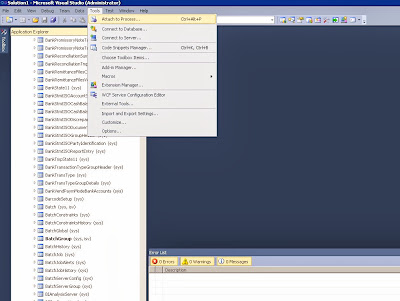
Source: https://community.dynamics.com/ax/b/mafsarkhan/archive/2011/05/30/how-to-debug-batch-jobs-and-service-operations-in-dynamics-ax-2012.aspx#.UjwULcZT6k8
- Open Visual Studio as 'administrator' and attach the debugger to the Ax32Serv.exe process.
- Once done, open up the file you want to debug in Visual Studio. All of the X++ code is compiled into IL and can be found in the following directory after deployment:..\Program Files\Microsoft Dynamics Ax\6.0\Server\AxaptaDev\Bin\XppIL\source\
- Set a breakpoint in the file you opened.
- Go to Ax and run the process in batch mode, or execute the service operation. This will end up hitting your breakpoint, provided you set it in the right place.
Source: https://community.dynamics.com/ax/b/mafsarkhan/archive/2011/05/30/how-to-debug-batch-jobs-and-service-operations-in-dynamics-ax-2012.aspx#.UjwULcZT6k8
Subscribe to:
Posts (Atom)